Street Defense Reflex Challenge
Reviews
Description
Game Introduction
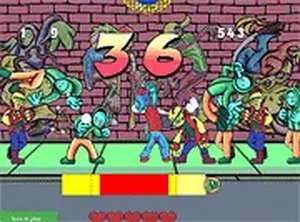
Street Defense Reflex Challenge is a free browser-based action game that places you in a street confrontation scenario. Your core objective is to defend yourself against a line of opponents who are waiting to strike. The game emphasizes timing and precision as you block incoming punches and deliver your own counterattacks. With each successful hit, you reduce the number of opponents and move closer to victory. This game is designed for desktop play and offers a straightforward yet challenging experience. It runs directly in your browser without any downloads. You can also enjoy it in full screen mode for a more immersive feel. Street Defense Reflex Challenge is part of a collection of action games that test your reflexes and strategic thinking. The game's simple mechanics make it accessible to players of all ages, while its increasing difficulty provides a satisfying challenge for those who enjoy honing their skills. The street theme adds a layer of realism and intensity, making each encounter feel engaging. Whether you have a few minutes or want to play longer sessions, this game adapts to your schedule. Its free-to-play nature ensures that anyone can jump in and start playing immediately, with no barriers to entry. The game is optimized for desktop browsers, ensuring smooth performance and responsive controls. Full screen mode enhances the experience by removing distractions and focusing your attention on the action. Overall, Street Defense Reflex Challenge offers a pure, timing-based challenge that rewards practice and patience.
How to Play
To play Street Defense Reflex Challenge, use your keyboard on a desktop computer. When an opponent throws a punch, a punch icon will appear on the screen. Your goal is to press the left or right arrow key when this icon is inside the yellow meter. If you time it correctly, you will land a hit on the opponent and reduce their count. The game requires quick reactions and good timing to succeed. Each successful defense and counterattack brings you closer to clearing the line of opponents. Practice your timing to improve your performance and achieve higher scores. The game provides clear visual cues to help you know when to act. As you progress, the pace may increase, requiring faster responses. The controls are simple and intuitive, allowing you to focus entirely on the timing challenge. There are no complex combos or special moves to learn, making it easy to pick up but difficult to master. The game is designed to be played in short bursts, making it ideal for quick gaming sessions. You can restart at any time to try again and improve your score. The feedback from each action is immediate, helping you learn from mistakes and adjust your strategy. Overall, the gameplay loop is straightforward: watch, time, and act.
Game Features
Street Defense Reflex Challenge includes several features that enhance the experience. It is free to play, requiring no payment or subscription. The game is desktop-only, optimized for keyboard controls on computers. Full screen mode is available for a more immersive experience. The core gameplay is timing-based combat, where you must press keys at the right moment to succeed. The street confrontation theme provides a clear and engaging setting. The game offers a straightforward challenge that is easy to understand but hard to master. It runs directly in your browser with no downloads or installations needed. The visual design is clear, with icons and meters that guide your actions. The game is part of a larger collection of action games, offering variety for players who enjoy this genre. The difficulty scales naturally as you progress, providing a gradual increase in challenge. The game is designed for quick sessions, making it suitable for casual play. Overall, these features combine to create a focused and enjoyable action experience.
Tips for Success
Focus on the yellow meter and practice your timing to land hits consistently. Stay calm under pressure, as quick reactions are key to blocking and countering. Try to anticipate the opponent's movements to improve your response time. Regular practice will help you refine your skills and achieve higher scores. Pay attention to the visual cues and learn the rhythm of the game. Take breaks if you feel frustrated, as a fresh mind often performs better. Experiment with different focus techniques to find what works best for you. The more you play, the more natural the timing will become.






Comments
Sign in to comment
You must be logged in before posting a review or rating.
No account? Create one
No comments yet. Be the first to comment!